
For ship chandlers
AI quoting software for ship chandlers
Ship chandlers work under pressure. QuotifAI reads your customers' RFQ sheets, matches IMPA and ISSA numbers against your catalogue, converts units, applies your pricing and gets a response out before the next chandler does.
SAP · Microsoft Dynamics 365 · Exact · Odoo · Klipboard Wholesale · custom legacy systems
From purchasing@example.com
Subject RFQ-88213 MV EXAMPLE STAR, Rotterdam ETA 28-10
Good morning, please quote for MV EXAMPLE STAR, sailing 29/10.
10 shackle galv 16mm (IMPA 232514)
2 coils rope polyprop 12mm x 220m
4 fuel filter element for aux engine, see att.
...
Customer
Example Shipping Ltd
Vessel
MV EXAMPLE STAR
#
Item
Quantity
Total
1
Shackle galv 16mm
SH-16-GALV SHACKLE BOW GALVANISED 16MM
10 PCE
€62.00
2
Rope polyprop 12mm x 220m
RP-PP12-220 ROPE POLYPROPYLENE 12MM 220M
2 COIL
€122.40
3
Fuel filter element, aux engine
FF-AUX-2207 FILTER ELEMENT FUEL AUX ENGINE
4 PCE
€153.00
Estimated total 8 lines
€712.09
All 8 lines checked
Create quote and send
Trusted by


Works alongside your ERP
SAP
Microsoft Dynamics 365
Exact
Odoo
Klipboard Wholesale
Custom legacy systems
SAP
Microsoft Dynamics 365
Exact
Odoo
Klipboard Wholesale
Custom legacy systems
Why speed decides it
The first complete quote usually takes the order
A purchasing officer sends the same RFQ to several chandlers at once and works down the replies as they arrive. For a chandler, response time is not an efficiency measure, it is how the order is won.
Answered as it lands
A request that arrives while your team is busy is not left sitting until someone is free. It is read, matched and priced the moment it arrives.
Fast only counts if it holds up
Every line is matched on its IMPA or ISSA number and priced from your current list. Unclear items are flagged one at a time.
It remembers what you quoted before
Many requests include items you have priced before. Those are recognised straight away, so nobody has to look them up again, and anything new is remembered for next time.
From inbox to ERP
How AI quoting works for ship chandlers
RFQs arrive as Excel sheets, PDFs and plain email, some with IMPA codes and some without. QuotifAI reads them, matches each line to your catalogue and prices it, so your team spends its time on the few lines that need a decision, not on retyping.

75 seconds. All data shown is fictional sample data.
01
Every RFQ in one queue
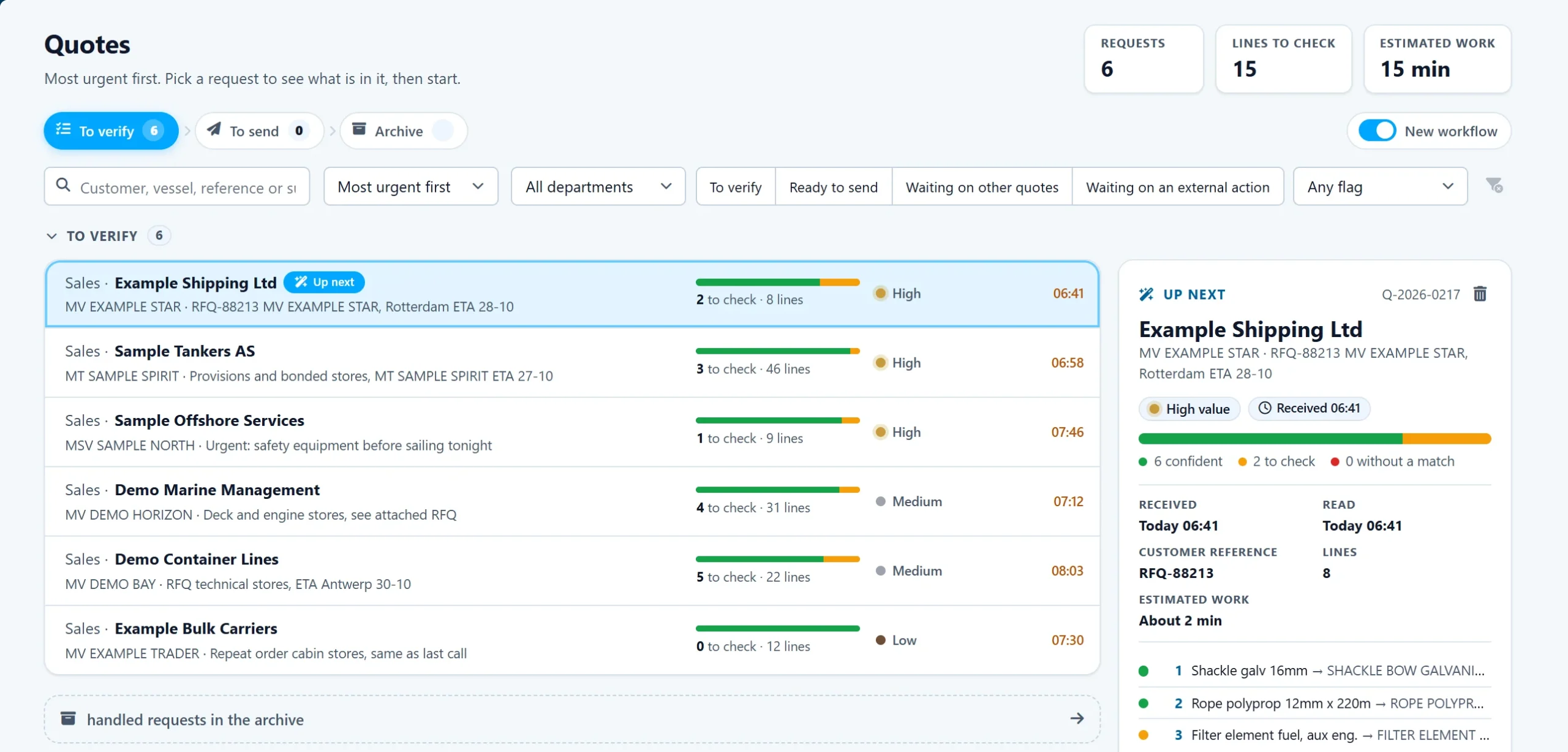
Shipping companies, managers and agents send RFQs as Excel sheets, PDFs and plain email. QuotifAI reads each one as it arrives and puts it in one queue, most urgent first, with the customer, the vessel, the number of lines and how many need checking.
Customer and vessel on every request
Lines to check and estimated work shown up front
Read in any language
02
The request lands, in whatever format it comes
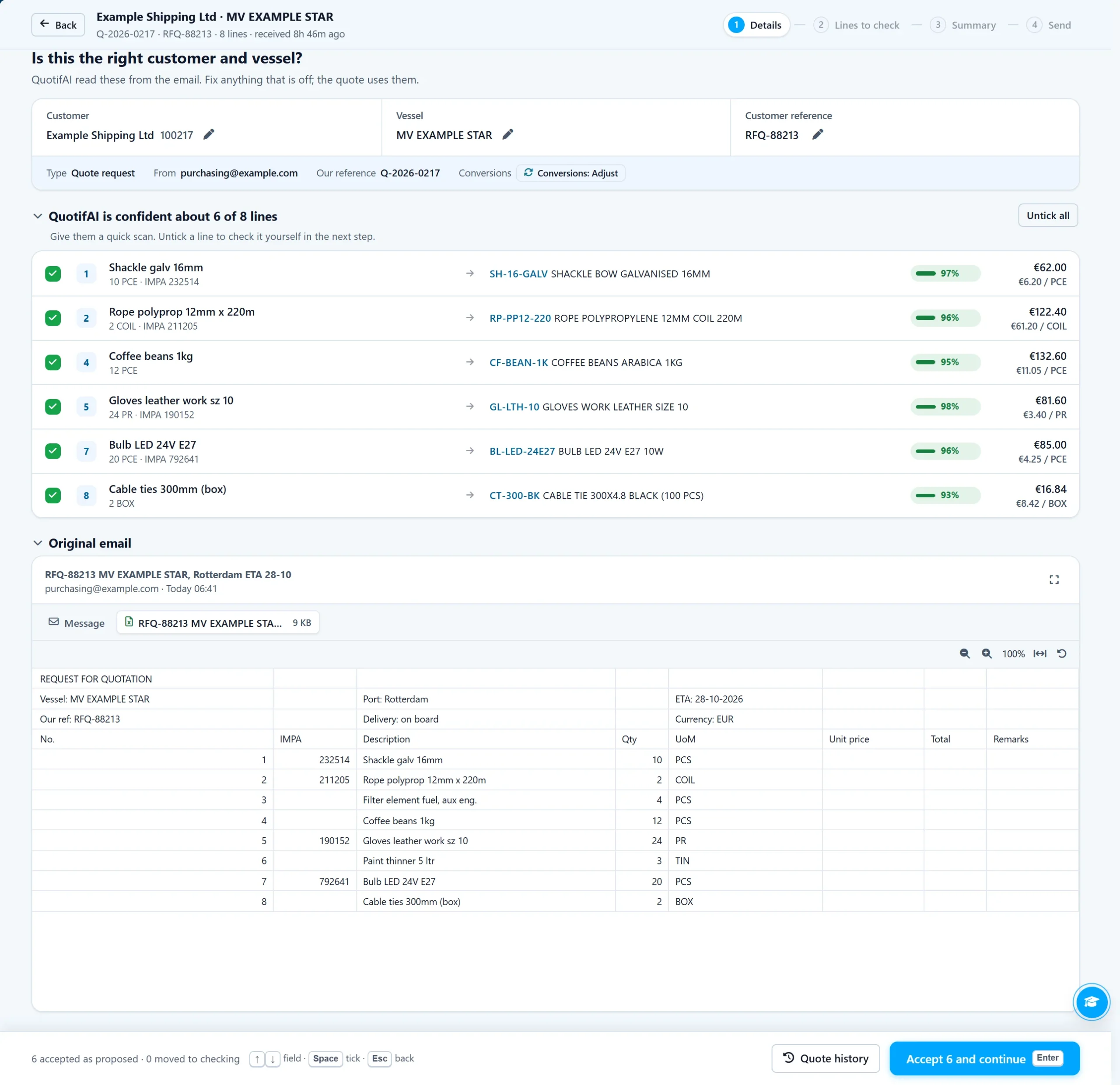
A purchasing officer sends their own Excel RFQ sheet. The column headers are theirs, the units do not match your catalogue and some descriptions are shorthand. Handled by hand, that is a long stretch of decoding, searching and typing for one request. QuotifAI reads the sheet the moment it arrives, picks out the customer and vessel, and matches every line.
Customer and vessel recognised from the email
Lines read from the customer's own sheet
Confident lines ready for a quick scan
03
Matching, converting, pricing, automatically
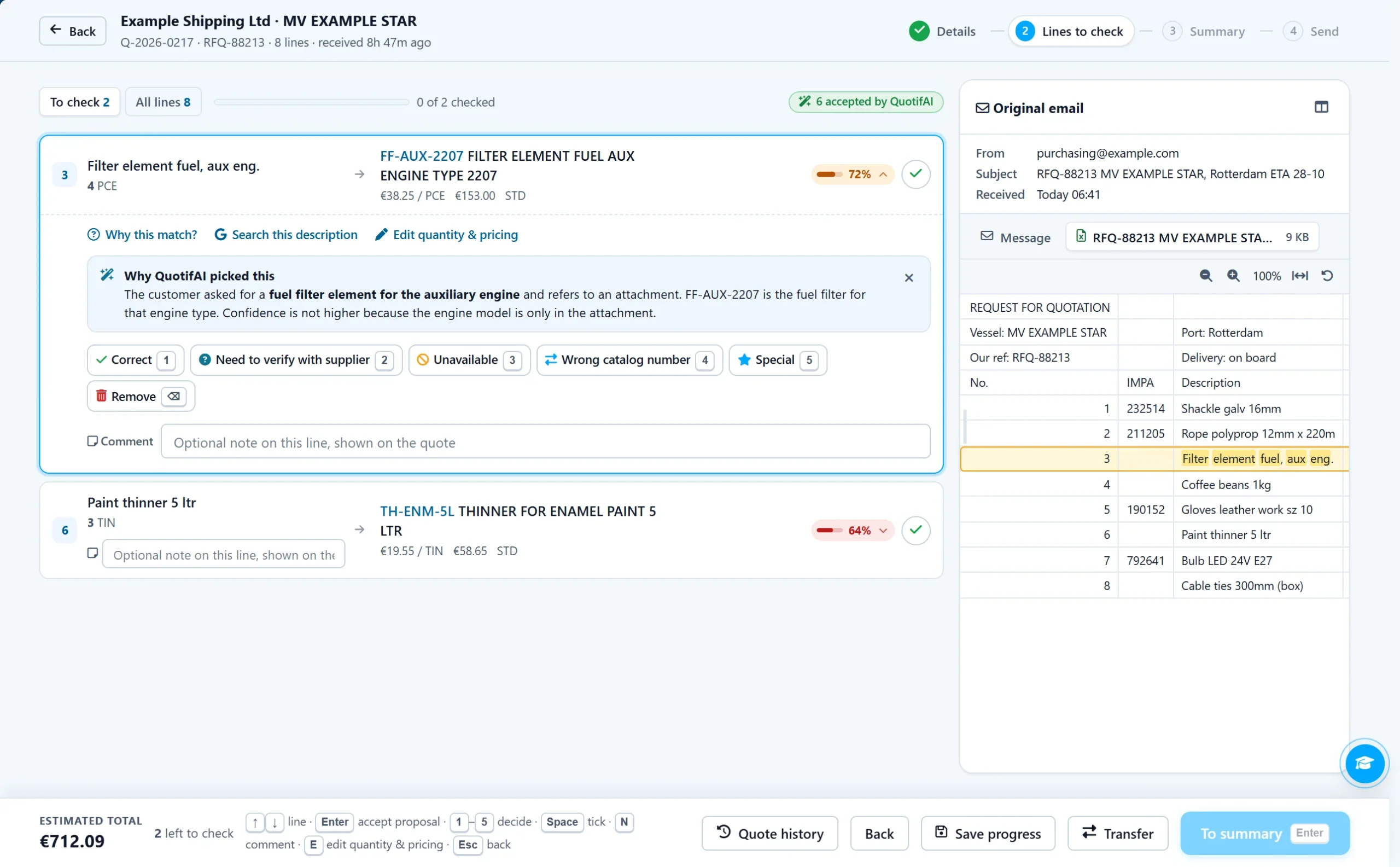
Each line is matched to your catalogue with the rules set for that customer: on the IMPA or ISSA number where there is one, on the description where there is not. Pack and unit conversions and your prices are applied. If one or two items are unclear, only those are flagged, with the reasoning behind the match and the row in the customer's sheet beside it.
Only the unclear lines flagged for review
The reasoning behind every proposed match
The line highlighted in the customer's sheet
04
Back in the customer's format, ready to send
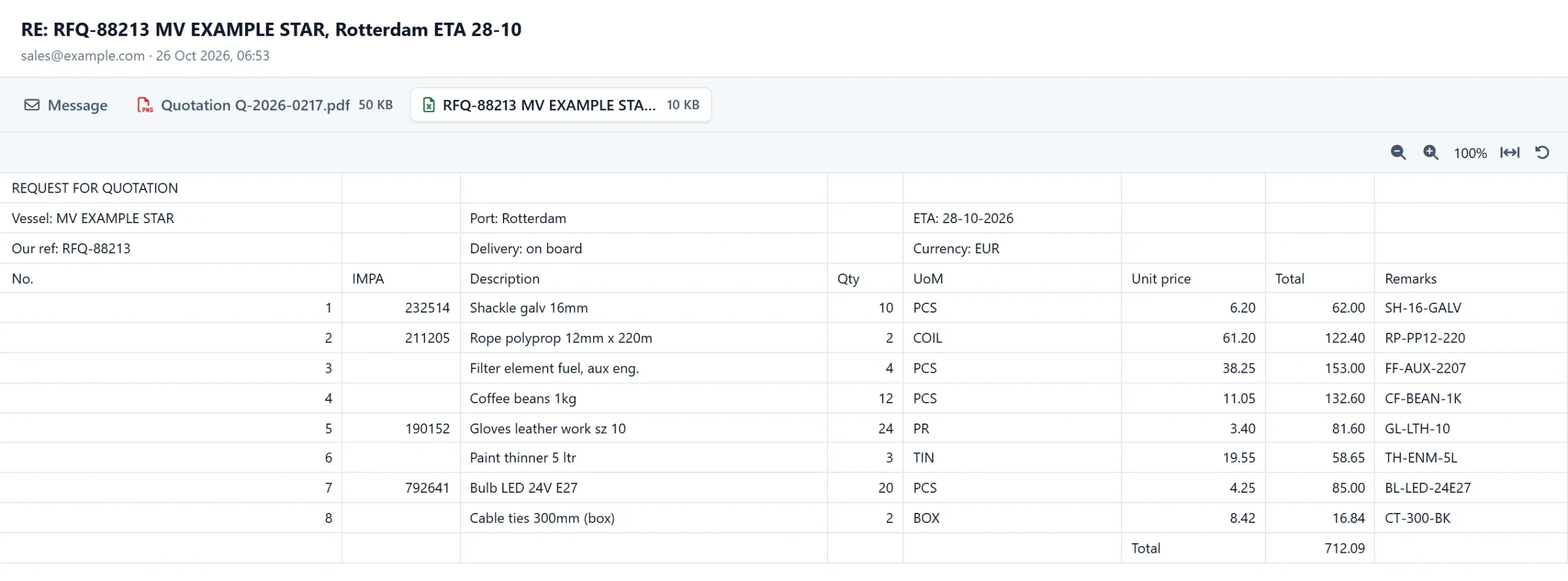
The finished quote is not a generic PDF from your system. It is the customer's own Excel sheet, filled in with your prices and quantities in the columns they expect, and it goes back to them in one click, or automatically if you choose.
The customer's own RFQ sheet, filled in
Your quotation as a PDF alongside it
Sent in one click, or automatically
05
Reports on volume, speed and accuracy
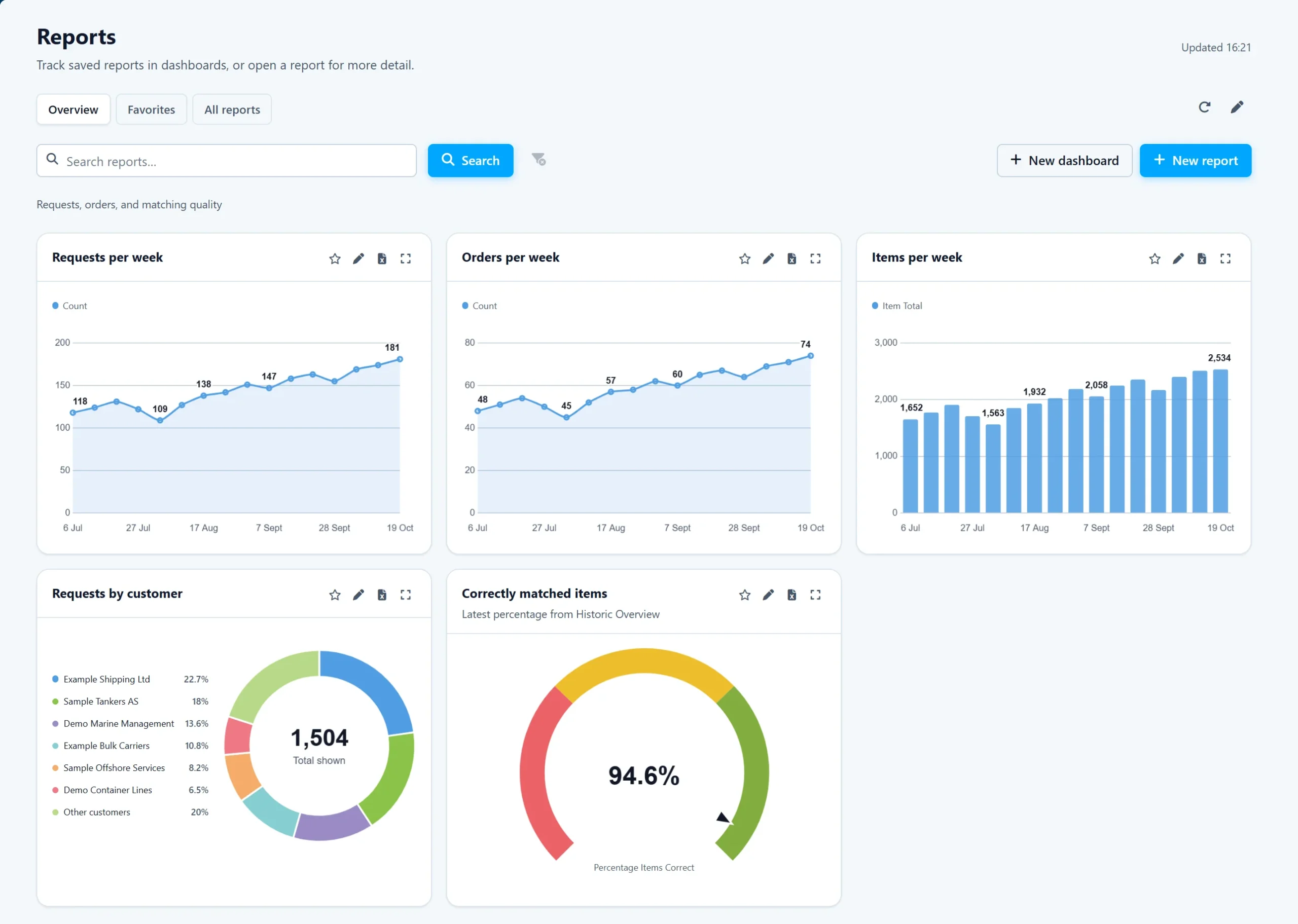
See how many RFQs, orders and lines came in each week, which shipping companies send the most and how often QuotifAI matched correctly. Build your own reports and share them as a dashboard or a spreadsheet.
Requests, orders and items per week
Requests per shipping company
Export any report to Excel
Why chandlers switch
Built for IMPA, ISSA and everything without a code
Every ship operator sends requests differently. One emails a scanned PDF. Another sends a 40-line Excel sheet they expect you to fill in and return. A third uses abbreviations only someone who has worked the docks for twenty years would recognise. QuotifAI reads whatever comes in, maps it to your catalogue, converts quantities and units where needed, and fills in the customer's own format. Your team reviews, approves and sends, and the vessel gets an answer while it is still in port.
Fills the customer's own RFQ sheet
QuotifAI outputs the quote directly into the Excel format your customer sent. No reformatting, no manual copy-paste.
IMPA, ISSA and your own codes
QuotifAI reads IMPA and ISSA numbers and your customers' own reference numbers, and matches them against your catalogue. Where no code is given, the description is matched instead, and your corrections improve future matches.
Pack and unit conversions
Cases to pieces and other pack sizes: quantities and prices are converted to the unit you sell in, or kept in the customer's unit, set per customer.
The vessel on every request
QuotifAI reads the vessel from the request and keeps it with the quote. A request without a vessel can be held until one is set.
Scanned PDFs and photos
A scanned requisition or a photo of a printed list is read page by page, the same way as a typed email or an Excel sheet.
One email, several RFQs
When one email carries separate RFQs as attachments, each becomes its own quote with its own vessel, linked to the same email.
Also automated with QuotifAI:
AI quoting for wholesale distributors →Under the hood
Features built for ship chandlers
Items outside your catalogue
Chandlers are asked for things they do not stock every day. Quote them as a special, with past specials, supplier prices and recent delivery times to hand. QuotifAI can also look up suppliers and email them from your mailbox for a price.
RFQs from procurement portals
When an RFQ arrives through a customer's procurement portal, QuotifAI signs in, picks up the request, prices it through the same workflow and fills the answer back into the portal. Every portal job is recorded so you can replay it.
Stock and backorder warnings
When your ERP shares stock levels, a line that asks for more than you have is marked, with the expected backorder quantity and date, so you know what can go on board before the vessel sails.
Teams, roles and departments
Give provisions, deck and engine stores each their own queue and each person the rights they need. Requests move to another department in one click, and roles decide what each person can do.
A full history of every quote
Every change to a quote is recorded: who changed which line, from what to what, and when. Useful when a superintendent queries a price weeks later.
Works in nine languages
Requests are read in any language, and the app is available in English, Dutch, German, French, Spanish, Italian, Greek, Chinese and Japanese, so every team works in its own language.
ERP connection
We create the ERP connection for you.
We create and maintain the integration to your existing systems end-to-end, integrating with major ERP systems like SAP, Microsoft Dynamics 365, Exact, Odoo, Klipboard Wholesale, and custom legacy systems.
Your ERP
yours
⇅
Integration layer
we build it
⇅
QuotifAI
we run it
Related solutions
Other workflows we can automate
Use the same platform for the operational work around quoting, pricing, and order handling.
Sales inbox automation
Sort every order and quote request before anyone opens the inbox
QuotifAI reads each incoming message, decides whether it is an order, a quote request or neither, and files it into the right folder in your existing mailbox.
Customer portals
Stop copying quote data between portals and your ERP
QuotifAI finds the RFQ, applies your existing matching and pricing workflow, and fills the completed response back into the portal.
Custom AI automation
Have a process that no product covers? We build it
You bring the idea and the knowledge of how the work is done. We build the AI that runs it, put it into production and keep it running.
Book a demo
What happens after you request a demo
A demo is a conversation about how your team quotes today, with QuotifAI shown working on a sample request. If you want to go further, we can then set up a separate environment loaded with your own price list.
1
A short call about your quoting
We look at how requests reach you today, which ERP you run and where the time goes in your quoting.
2
See it run on a sample request
We show QuotifAI working through a sample quote request from start to finish: reading it, matching and pricing the lines, and the review before it goes out.
3
Try it free on your own price list
After the demo, we can set up a separate environment loaded with your own price list, normally within a few days. You email your test requests into it and see what comes back, at no cost and with no obligation.
Your data stays in a dedicated environment. See security and control.
Questions
Questions about AI quoting for ship chandlers
What does AI quoting software do for a ship chandler?
It takes over the work between an RFQ arriving and a priced response being ready to send. QuotifAI reads the request in whatever format it comes, matches every line to your catalogue, converts units where needed, applies your pricing and fills in the customer's own format. Your team reviews, approves and sends, while the vessel is still in port.
Does it match IMPA and ISSA codes?
Yes. An IMPA or ISSA number is recognised as one and matched on the code. Your customers' own reference numbers are matched as well, and a line that arrives with no code at all is matched on its description instead. Your corrections improve future matches.
Can it fill in the customer's own RFQ sheet?
Yes. When a customer sends an Excel sheet they expect back, QuotifAI fills in your prices and quantities in the columns they use. There is no reformatting and no copy-paste into a generic PDF from your system.
How does it handle different units and product codes per customer?
Conversions follow your rules, from cases to pieces and other pack sizes, and can be set per customer. Every shipping company has its own product codes, preferred units and layout, and QuotifAI is configured to match each one.
How fast does a response go out?
A request is read, matched and priced the moment it arrives, so it is not left waiting until someone on your team is free. Requests that come in overnight are processed and ready for approval when your team arrives in the morning.
What happens when an item is unclear?
Only that line is flagged. If one or two items in a request are ambiguous, QuotifAI marks those for review rather than the whole request, and your team approves before anything goes out.
Can it handle RFQs that arrive through a procurement portal?
Yes. QuotifAI signs in to the portal, finds and verifies the request, prices it through the same workflow as any other RFQ, then reopens the quote and fills the answer back in. Every portal job is recorded so you can replay it. See customer portal automation.
Can we try it on our own pricelist before committing?
Yes. After the demo we can set up a separate environment for your own company, normally within a few days. It is loaded with your own pricelist and stands on its own, so you email the requests you want to test into it and see what comes back, at no cost and with no obligation, before anything is connected to the systems you run on. See request a demo.
Ready to automate your quotation process? Schedule a free demo.
See QuotifAI work through a sample request, then try it free on your own pricelist.
Request a demo