
AI portal automation
Automate customer portal quotes from request to response
The QuotifAI AI portal agent logs in to customer portals, retrieves quote requests, processes and prices every line, then returns to fill the completed quote back into the portal.
AI portal agent · RFQ retrieval · ERP pricing · automated portal entry · video replay
⇆ Portal job PJ-2261 on the QuotifAI agent host, recorded end to end
| Line | Requested item | Qty | Your price |
|---|---|---|---|
| 12 | Gasket set, DN80 PN16 | 12 | € |
| 19 | Bearing 6208-2RS | 8 | € |
| 27 | Impeller, bronze 4" | 2 | € |
| 33 | Hose clamp W4 60–80 | 40 | € |
Agent Waiting for the portal job to start Signing in with the account assigned to this portal Locating the request and checking its reference Retrieving the header and every line of the request Matched to your catalogue, your ERP pricing applied Entering the approved prices in the portal quote fields Quote saved in the portal, session kept for replay
+ 38 more lines in the same request
Illustration with sample data. The agent drives a real browser, so anything it does in the portal can be watched live or replayed afterwards.
Trusted by


Why automate customer portals
Stop copying quote data between portals and systems
Many customers publish quote requests inside their own procurement portals. Your team has to sign in, find the right RFQ, download or copy every line, process it in your own systems, then return to enter the completed quantities and prices.
QuotifAI connects those steps. It retrieves the request, sends the data through your existing matching and pricing workflow, and fills the processed quote back into the portal. Your team keeps control of review and submission without repeating the data entry.
Fetch portal RFQs automatically
Open the correct request, verify its reference, and retrieve every quote line without manual copying.
Write results back into the portal
Return after processing and complete the portal fields or use its supported import workflow.
Keep your pricing workflow
Product matching, units, quantities and prices still follow your existing QuotifAI and ERP rules.
Learns how each customer portal works
The AI works out how the portal is structured and remembers successful navigation and login state, so repeat jobs can move faster.
A person can step in when needed
If the AI agent reaches a step that needs a decision, it waits for an operator and resumes in the same portal session.
Watch and replay every portal job
Follow the AI agent live or replay the full browser session in video format to see exactly what it did.
From portal request to completed response
How customer portal automation works
01
The portal request is found and retrieved
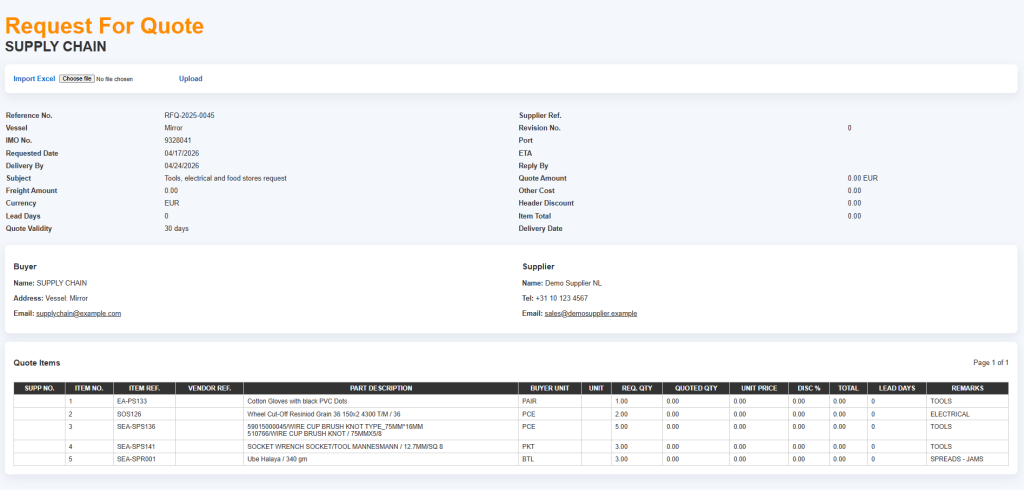
QuotifAI opens the configured customer portal, signs in with the assigned account and locates the correct RFQ. It verifies the reference before extracting anything. When the portal offers an Excel or PDF export, the agent downloads it. Otherwise it captures the full header and every item page in a stable order.
02
QuotifAI processes and prices every line
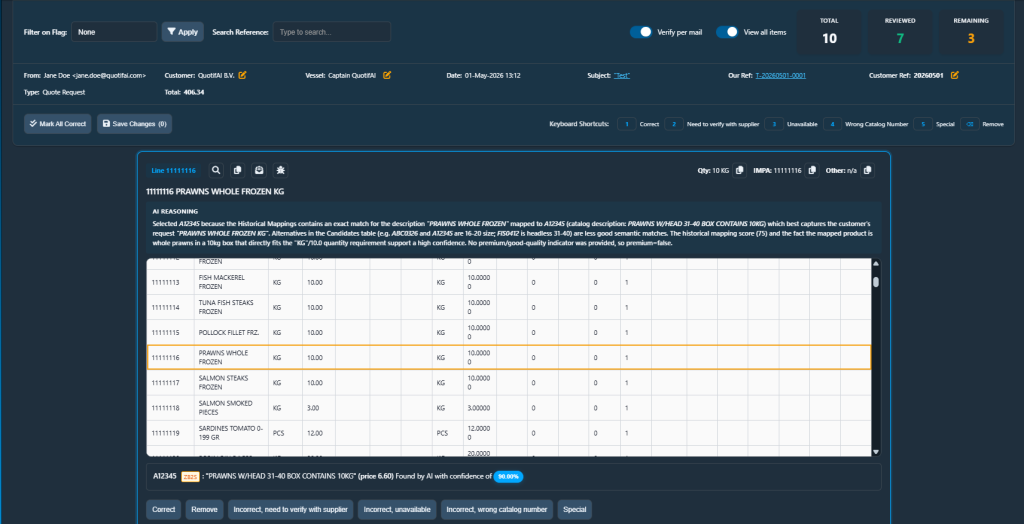
The retrieved request enters the same QuotifAI workflow as any other RFQ. Product descriptions are matched to your catalogue, quantities and units are normalised, and customer-specific ERP pricing and margin rules are applied. Incomplete or ambiguous lines stay visible for review instead of being silently submitted.
03
The completed quote is filled back into the portal
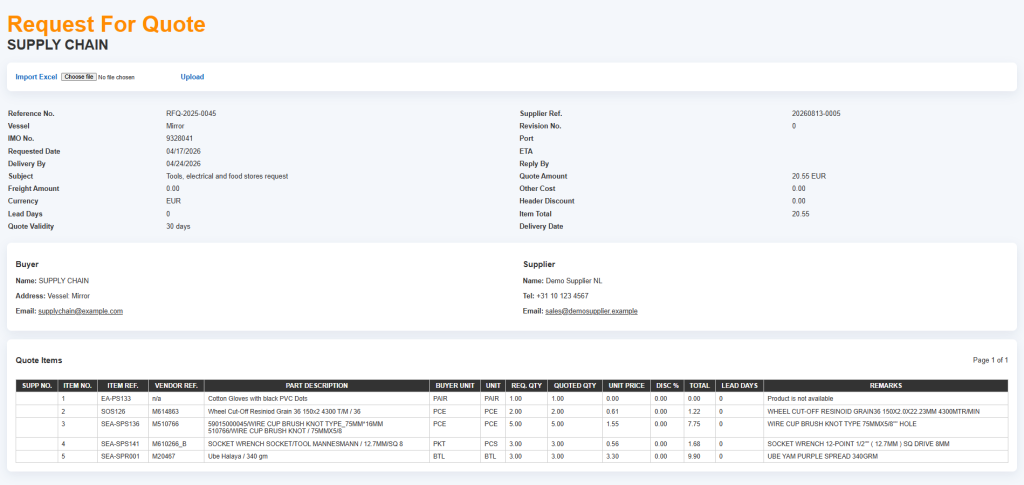
After processing, QuotifAI returns to the same customer portal and opens the quote for editing. If the portal supports an Excel import, the completed dataset is uploaded first. Otherwise the required quantities, units and prices are entered into the portal fields and checked before the workflow continues.
04
The result and video replay stay available
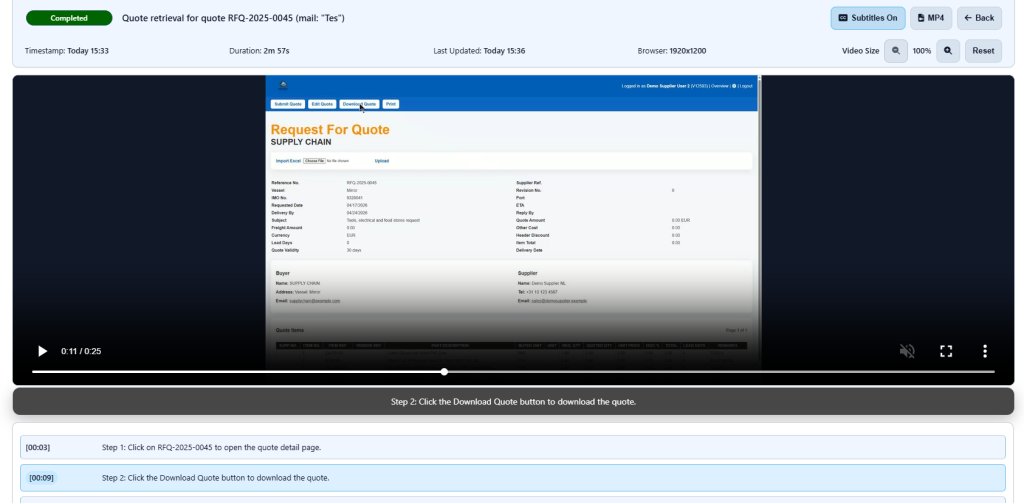
Each portal job keeps its status, event history and recorded browser activity. You can rewatch what the AI agent did in video format, review the result and available files, or stop a running job when the workflow should not continue.
What AI portal automation delivers
Benefits of AI customer portal automation
Automatic portal RFQ retrieval
Finds the correct request, verifies its reference and retrieves all quote lines from the customer portal.
Completed quote data written back
Returns to the portal after processing and fills the approved quantities, units and prices back into the quote.
Download and import first
Uses supported portal exports and imports when available, reducing repetitive field-by-field handling.
Portal form entry when needed
Falls back to controlled keyboard and browser entry when a portal has no usable import workflow.
Your portal login stays protected
Portal credentials are encrypted and only decrypted on the QuotifAI agent host when the AI needs to log in. Password values are not shown in job logs.
A person can take over
The AI agent can pause for an authorised operator, then continue from the same browser session after the step is handled.
Portal files are checked before use
Files retrieved from the customer portal are checked before QuotifAI uses them in the quote processing workflow.
Replay what the AI agent did
Rewatch the complete portal job in video format and see how the AI moved from the original RFQ to the completed portal response.
Your portal workflow stays visible
See what the AI portal agent is doing
Remembers successful portal workflows
The AI agent reuses saved portal learnings and login state, helping repeat quote jobs reach the right screens faster.
Watch live or replay later
Follow the portal job while it runs, then rewatch the recorded browser session as a video whenever you need it.
Take over when the AI needs help
An authorised operator can take control of the open browser session, handle the step and let the AI agent continue afterward.
Customer portal automation FAQ
Common questions about AI customer portal automation
What is AI customer portal automation?
It connects the manual steps around portal-based RFQs. The QuotifAI AI agent opens the customer portal, retrieves the request, processes it through your quote workflow and fills the completed values back into the portal.
Can QuotifAI retrieve a quote and fill it back into the same portal?
Yes. The workflow is designed as a closed loop: retrieve the correct request, process and price the lines, then reopen the portal quote and enter or import the completed result.
Does the AI agent learn how a customer portal works?
Yes. The AI works out how the website is structured as it operates. Successful portal learnings and login state can be reused, helping repeat jobs navigate the same portal faster.
How are portal login credentials handled?
Portal credentials are encrypted and only decrypted on the QuotifAI agent host when the AI needs to log in. Password values are not shown in job logs. For the full picture, see security and control.
Can I rewatch what the AI agent did?
Yes. The browser session is recorded so you can replay the portal job in video format and see how the AI moved from the original request to the completed portal response.
What happens if the AI agent needs help?
The job can pause while keeping the same browser session open. An authorised operator takes control, handles the step and resumes the automation from the current page.
Do we need the full QuotifAI quoting platform to use this?
In the normal setup, yes. The AI agent retrieves the request from the portal, QuotifAI prices the lines, and the agent fills the completed response back in. If you only need the retrieval and the data entry, the agent can run without QuotifAI and write what it collects into a system you nominate instead. Pricing is the step that depends on the platform.
Ready to automate customer portal quotes?
See QuotifAI retrieve, process and fill back a real portal request.